Class 6 Computer Studies – MS Office, Internet, Browsers & AI Full Guide
April 7, 2026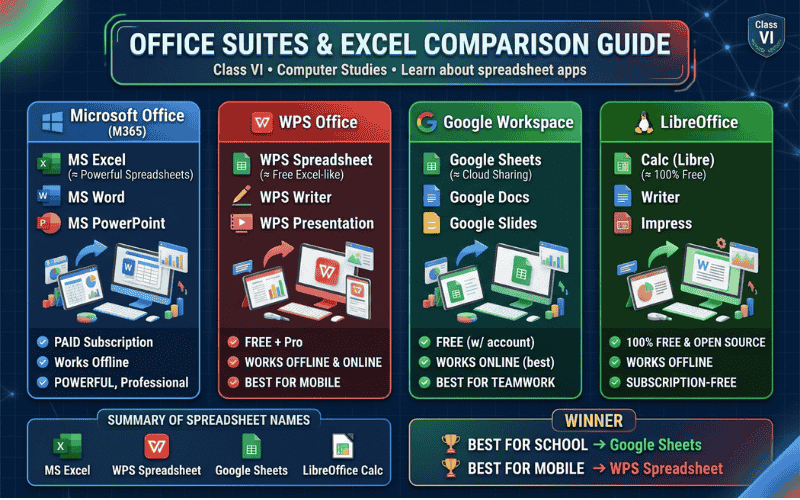
Office Suites
Apps & Excel Compared
Discover every application inside WPS Office, Google Workspace, and LibreOffice — and see how their spreadsheet tools stack up against Microsoft Excel!
Applications in Each Suite
Every office suite has different programs (called applications). The one highlighted in green is the spreadsheet app — the equivalent of MS Excel.
Microsoft Office
MS Word
Word processor — letters, essays, reports
MS Excel
Spreadsheets, charts, calculations
MS PowerPoint
Slide presentations with design
MS Outlook
Email and calendar management
MS OneNote
Digital notebook for notes
MS Access
Database management system
MS Publisher
Posters, brochures, and flyers
MS Teams
Video calls and team collaboration
MS Visio
Diagrams and flowcharts
WPS Office
WPS Writer
Word processor — like MS Word
WPS Spreadsheet
Spreadsheets and data — like Excel
WPS Presentation
Slide shows — like PowerPoint
WPS PDF
Read, edit and convert PDF files
WPS Cloud
Save and share files online
WPS AI
AI writing and data assistant
WPS Office for Mobile
All-in-one app for phones/tablets
WPS Image Editor
Basic photo and image editing
Google Workspace
Google Docs
Documents — like MS Word
Google Sheets
Spreadsheets — like MS Excel
Google Slides
Presentations — like PowerPoint
Gmail
World’s most popular email service
Google Drive
15 GB free cloud file storage
Google Calendar
Schedule events and reminders
Google Meet
Free video calling for classes
Google Forms
Online quizzes and surveys
Google Sites
Build simple websites easily
Google Chat
Team messaging and collaboration
Google Jamboard
Digital whiteboard for ideas
LibreOffice
Writer
Word processor — like MS Word
Calc
Spreadsheet — like MS Excel
Impress
Presentations — like PowerPoint
Draw
Diagrams, shapes and drawings
Base
Database — like MS Access
Math
Type maths formulas and equations
LibreOffice Basic
Programming macros and automation
📊 Spreadsheet App Names Across Each Suite
Detailed Comparison with MS Excel
How do WPS Spreadsheet, Google Sheets, and LibreOffice Calc compare to the king — MS Excel? Let’s find out feature by feature!
| Feature | 🪟 MS Excel | 📄 WPS Spreadsheet | 🔵 Google Sheets | 🐧 Calc (Libre) |
|---|---|---|---|---|
| ⚙️ BASICS | ||||
| Cost | Paid ₹4,200/year (M365) |
Free + Pro Basic is free |
Free With Google account |
100% Free Always free |
| Works Offline | ✅ Yes | ✅ Yes | ⚠️ Limited | ✅ Yes |
| Works Online (Cloud) | ✅ Yes | ✅ Yes | ✅ Yes (best) | ❌ No |
| Works on Mobile | ✅ Yes | ✅ Yes (great) | ✅ Yes (great) | ⚠️ Limited |
| Open Source | ❌ No | ❌ No | ❌ No | ✅ Yes |
| 🔢 DATA & FORMULAS | ||||
| Number of Formulas | 500+ formulas | 400+ formulas | 400+ formulas | 500+ formulas |
| IF / VLOOKUP / XLOOKUP | ✅ All 3 | ✅ All 3 | ⚠️ No XLOOKUP yet | ✅ All 3 |
| Pivot Tables | ✅ Best in class | ✅ Supported | ⚠️ Pivot Charts only | ✅ Supported |
| Max Rows per Sheet | 1,048,576 rows | 1,048,576 rows | 10,000,000 cells | 1,048,576 rows |
| AutoFill Smart Patterns | ✅ Excellent | ✅ Good | ✅ Smart Fill | ⚠️ Basic |
| 📈 CHARTS & VISUALS | ||||
| Chart Types Available | 70+ types | 50+ types | 40+ types | 50+ types |
| Sparklines (mini charts) | ✅ Yes | ✅ Yes | ✅ Yes | ⚠️ Limited |
| Conditional Formatting | ✅ Advanced | ✅ Good | ✅ Good | ✅ Good |
| 🤝 COLLABORATION | ||||
| Real-time Co-editing | ⚠️ With M365 | ⚠️ With WPS Cloud | ✅ Best in class | ❌ No |
| Sharing with Link | ✅ Yes | ✅ Yes | ✅ Yes (easiest) | ❌ No |
| Comments & Notes | ✅ Yes | ✅ Yes | ✅ Yes | ✅ Yes |
| 📁 FILE FORMATS | ||||
| Native File Format | .xlsx | .xlsx / .et | .gsheet (online) | .ods |
| Open Excel (.xlsx) files | ✅ Native | ✅ Excellent | ✅ Good | ✅ Good |
| Export to PDF | ✅ Yes | ✅ Yes | ✅ Yes | ✅ Yes |
| 🤖 AI & ADVANCED FEATURES | ||||
| AI / Copilot Assistant | ✅ Copilot (M365) | ✅ WPS AI | ✅ Gemini in Sheets | ❌ No |
| Macro / Automation | ✅ VBA (very powerful) | ✅ VBA compatible | ⚠️ Google Apps Script | ✅ LibreOffice Basic |
| Data Analysis Tools | ✅ Best (Power Query) | ⚠️ Basic | ⚠️ Basic | ⚠️ Basic |
| 😊 EASE OF USE (for Students) | ||||
| Easy to Learn | ⚠️ Medium | ✅ Easy | ✅ Easiest | ⚠️ Medium |
| Best for Students | ⚠️ If school provides | ✅ Great choice | ✅ Best for school | ⚠️ If on budget |
Unique Strengths — Spotlight
Each spreadsheet tool has something special it does better than the others. Here’s what makes each one stand out!
MS Excel
The most powerful and professional spreadsheet tool ever made. Used in banks, businesses, and science labs. Has the most advanced formulas, charts, and data tools. The gold standard that everyone compares to.
🏆 Most PowerfulWPS Spreadsheet
Looks and works almost exactly like MS Excel — making it the easiest switch. Has a clean mobile app and works on Android phones perfectly. Free for basic use and supports Excel files without any problems.
📱 Best for MobileGoogle Sheets
The best for teamwork — multiple people can edit the same sheet at the same time! Completely free with a Google account. Saves automatically to the cloud, so you never lose your work. Perfect for school projects.
🤝 Best for SharingLibreOffice Calc
Completely free forever — no subscription, no ads, no account needed. Open source so anyone can improve it. Has almost as many formulas as Excel. Best choice when you have no internet or no money to spend.
💰 100% FreeWhich Spreadsheet Should You Use?
For school students → Use Google Sheets. It’s free, works in your browser, saves automatically, and is perfect for group projects and homework. No installation needed!
For phone users → Use WPS Spreadsheet. It’s the best free Excel-like app for Android phones and tablets.
For home computers (no internet) → Use LibreOffice Calc. It’s 100% free, works offline, and is very similar to Excel.
For professional work → MS Excel is the most powerful and the industry standard used in all big companies.